A personal finance app is software that connects to your bank accounts or lets you log transactions manually, so you can see where your money goes, set a budget, track savings goals, and monitor your net worth in one place. In 2026, the strongest options are YNAB for hands-on budgeting, Monarch Money and Copilot for automatic tracking, Empower for a free dashboard, and Rocket Money for cutting subscriptions.
If you have ever ended a month wondering where your paycheck went, you are not alone. The right personal finance app turns that vague anxiety into a clear picture. This guide compares the leading choices, explains how these apps actually work, covers security, and gives you a simple process to pick the one that fits your habits and budget.
Pricing note: Prices and features below reflect public information as of September 2026 and change often. Always confirm current terms on each company’s website before subscribing. This article is educational and is not financial advice.
Key Takeaways
- A personal finance app is worth using only if you check it consistently — the “best” app is the one you will open weekly.
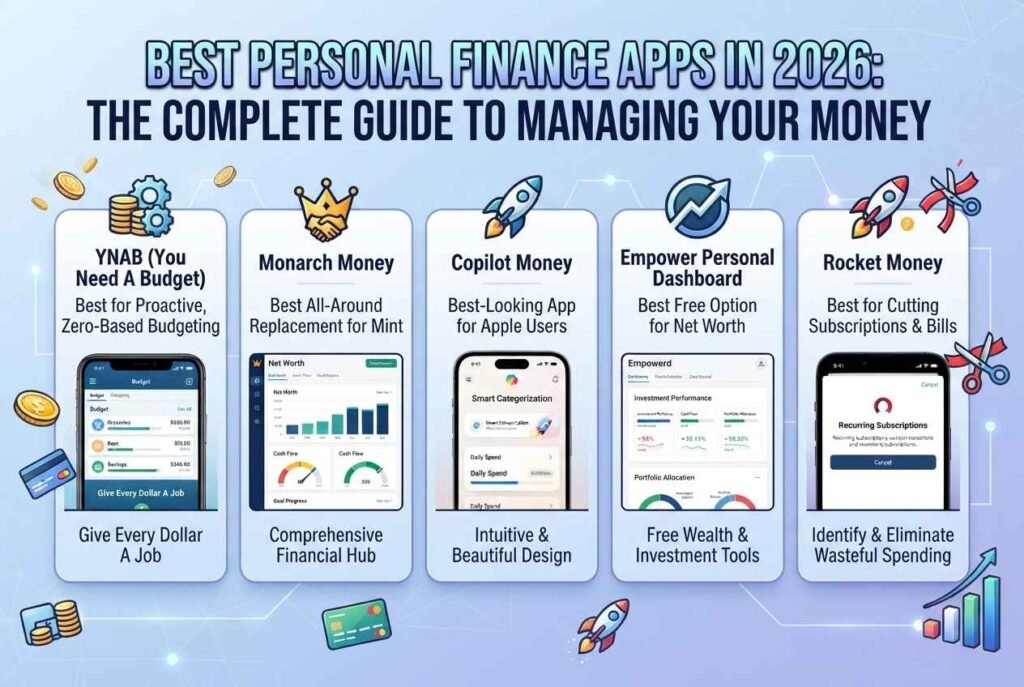
- YNAB suits people who want to plan every dollar; Monarch and Copilot suit people who prefer automatic tracking; Empower is a free option for net worth tracking; Rocket Money focuses on subscriptions and bills.
- Most good apps cost roughly $70–$110 per year; free tools exist but usually trade features or push advisory upsells.
- Prioritize security: strong two-factor authentication, read-only bank connections, and a clear privacy policy.
- Start with a free trial, connect two or three accounts, and judge the app after 30 days.
What Is a Personal Finance App?
A personal finance app helps you manage everyday money decisions from your phone or browser. Most combine several jobs:
- Budgeting: setting spending limits by category (groceries, rent, transport).
- Expense tracking: automatically importing and categorizing transactions.
- Net worth tracking: adding up assets (cash, investments, property) and subtracting debts.
- Goal setting: saving for an emergency fund, vacation, or down payment.
- Bill and subscription management: spotting recurring charges and upcoming due dates.
- Reports and insights: showing trends so you can change behavior.
The idea behind all of this is the old discipline of personal finance — earning, spending, saving, and investing wisely — delivered through software that removes most of the manual bookkeeping. If you are new to the fundamentals, see our beginner guide on [INTERNAL LINK: personal finance basics / how to budget article].
How Do Personal Finance Apps Work?
Most apps that sync with your accounts use a third-party “aggregator” to connect to banks. Well-known aggregators include Plaid, MX, and Finicity (owned by Mastercard). You log in through a secure window, choose which accounts to share, and the aggregator passes transaction data to the app. Some apps use several aggregators so that if one connection fails, another can take over.
Once data arrives, the app:
- Categorizes each transaction (often improved with machine learning).
- Compares spending with your budget or past trends.
- Alerts you about unusual charges, low balances, or upcoming bills.
- Summarizes everything in dashboards, charts, and weekly recaps.
Newer apps also add AI assistants that answer questions such as “How much did I spend on dining out last month?” or scan receipts to attach details to transactions. For a deeper look at how this technology works, read [INTERNAL LINK: How Does Artificial Intelligence Work? article].
Automatic Syncing vs. Manual Entry: Which Style Fits You?
There are two broad philosophies:
Automatic (bank-synced) apps save time and give a complete picture, but they require you to trust an aggregator and occasionally fix broken connections.
Manual or hybrid apps make you enter or confirm every transaction. It takes longer, but many people find this builds awareness and avoids linking banks at all. Envelope-style tools such as Goodbudget lean this way.
Neither approach is universally better. If you struggle with consistency, automation wins. If you overspend because you do not notice purchases, the friction of manual entry can actually help.
Best Personal Finance Apps in 2026 (Detailed Reviews)
1. YNAB (You Need A Budget) — Best for Proactive, Zero-Based Budgeting
YNAB asks you to give every dollar a job before you spend it. That approach forces intentional decisions and is popular with people who want to break the paycheck-to-paycheck cycle. As of mid-2026, published pricing is about $14.99 per month or $109 per year, with a 34-day free trial, and college students can often get a free year with proof of enrollment.
- Strengths: powerful goal and category planning, strong educational content, sharing with family members, web/iOS/Android support.
- Weaknesses: a learning curve, and no permanent free tier.
- Best for: people who enjoy rules, active engagement, and detailed control.
2. Monarch Money — Best All-Around Replacement for Mint
Monarch Money has become one of the most recommended apps since Mint shut down in early 2024. Public pricing lists Core at $99.99 per year (or $14.99 monthly) and a higher Plus tier around $199 per year, with a short free trial.
- Strengths: budgeting, net worth, investments, goals, and reports in one interface; links to banks through multiple providers for reliability; partner sharing and read-only access for a financial professional; AI features such as an assistant, weekly recaps, and receipt scanning; supports Android, iOS, and web.
- Weaknesses: no free plan; some advanced features sit in the higher tier.
- Best for: couples, families, and anyone who wants a polished, comprehensive dashboard.
3. Copilot Money — Best-Looking App for Apple Users
Copilot is praised for design and smooth daily use. Public pricing is about $13 per month or $95 per year. As of August 2026 it supports iPhone, iPad, Mac, and web, but not Android.
- Strengths: clean visuals, smart categorization, support for crypto tracking, quick daily check-ins.
- Weaknesses: Apple-focused; partner sharing typically means sharing full account access.
- Best for: Apple users who value simplicity and design.
4. Empower Personal Dashboard — Best Free Option for Net Worth
Empower offers a free dashboard for tracking net worth, investment performance, and fees. The trade-off is well known: Empower is also a financial advisory firm, so expect outreach about paid advisory services.
- Strengths: free, strong investment and retirement analysis tools.
- Weaknesses: budgeting features are lighter than dedicated budget apps; advisory sales calls possible.
- Best for: people with investment accounts who want to monitor overall wealth without paying a subscription.
5. Quicken Simplifi — Best Low-Cost Paid Option
Simplifi by Quicken is often priced around $70–$72 per year, making it one of the cheaper paid choices. It focuses on a forward-looking spending plan and watchlists for categories.
- Best for: budget-conscious users who still want automatic syncing.
6. Rocket Money — Best for Cutting Subscriptions and Bills
Rocket Money is built around finding recurring charges, helping cancel unwanted subscriptions, and (in paid tiers) negotiating some bills. It also offers basic budgeting and credit monitoring.
- Strengths: subscription discovery and cancellation help.
- Weaknesses: less depth for long-term planning; some features are paid, and negotiation services may involve fees.
- Best for: people whose main goal is trimming monthly waste.
7. EveryDollar — Best for Simple Envelope-Style Budgeting
EveryDollar uses a straightforward zero-based, envelope-style budget with minimal complexity. A free version is available, while bank syncing typically requires a paid plan.
- Best for: beginners who want simplicity and Dave Ramsey–style budgeting.
8. PocketGuard and Goodbudget — Best for Simple Cash-Flow and Envelope Tracking
PocketGuard highlights how much you can safely spend after bills and goals, while Goodbudget uses digital envelopes and works well for couples who budget together manually.
9. Acorns and Betterment — Best for Hands-Off Saving and Investing
If your goal is automated saving or investing rather than budgeting, Acorns (round-ups into investments) and Betterment (automated portfolios) are popular options. Investing carries risk and you can lose money; read our related guide [INTERNAL LINK: investing / fintech investors article] before you begin.
10. Spreadsheets (Google Sheets, Excel, Tiller) — Best for Total Customization
Free spreadsheets remain a favorite for people who like building their own system. Tools such as Tiller feed transactions into a spreadsheet automatically. This route needs more setup but offers unlimited flexibility.
Personal Finance App Comparison Table (2026)
| App | Approx. Price | Best For | Platforms | Free Trial/Tier |
|---|---|---|---|---|
| YNAB | ~$109/yr or $14.99/mo | Zero-based budgeting | Web, iOS, Android | 34-day trial |
| Monarch Money | ~$99.99/yr (Core) | All-in-one, couples | Web, iOS, Android | Short free trial |
| Copilot Money | ~$95/yr | Apple users, design | iOS, iPad, Mac, Web | Trial offered |
| Empower | Free | Net worth, investments | Web, iOS, Android | Free |
| Quicken Simplifi | ~$72/yr | Budget-friendly | Web, iOS, Android | Trial offered |
| Rocket Money | Free + paid tiers | Subscriptions | Web, iOS, Android | Free tier |
| EveryDollar | Free + paid sync | Beginners | Web, iOS, Android | Free tier |
Prices are approximate and may change. Verify on each official site. For an independent roundup, see NerdWallet’s guide to the best budget apps.
How to Choose the Right Personal Finance App (Step by Step)
Step 1: Define your main goal. Are you trying to stop overspending, pay down debt, save for a target, or grow investments? Different apps excel at different goals.
Step 2: Pick your budgeting style. Do you want to plan every dollar (YNAB), watch trends automatically (Monarch, Copilot), or just see net worth (Empower)?
Step 3: Check platform support. Make sure the app works on your phone, and on your partner’s if you share finances. Copilot’s Apple-only status matters if anyone in your household uses Android.
Step 4: Compare total cost. A $100 yearly subscription pays for itself if it helps you cancel a few forgotten subscriptions or avoid overdraft fees. Still, do not pay for features you will not use.
Step 5: Review security and privacy. See the security section below.
Step 6: Run a 30-day trial. Connect a few accounts, categorize a month of spending, and see whether you actually open the app. Consistency is the real test.
Are Personal Finance Apps Safe?
Reasonable caution is smart, because these apps handle sensitive data. Key safeguards include:
- Read-only access: reputable apps view transactions but cannot move money from your bank accounts.
- Encryption: data should be encrypted in transit and at rest.
- Two-factor authentication (2FA): enable it on the app and on your bank.
- Aggregator transparency: learn which provider (Plaid, MX, Finicity) links your accounts and how to revoke access.
- Privacy policy: confirm whether the company sells or shares your data. Subscription-funded apps generally have less incentive to monetize your data than free ones, though you should still read the policy.
For official guidance on protecting yourself, see the Consumer Financial Protection Bureau and the Federal Trade Commission’s consumer advice. Keep in mind that deposits at banks are insured by the FDIC up to legal limits, but a budgeting app itself is not a bank and does not hold FDIC-insured deposits. See also our guide on [INTERNAL LINK: online security / protect your data article].
Free vs. Paid Personal Finance Apps
Free apps can be excellent for basic tracking, but they may limit features, show ads, or promote financial products and advisory services. Always ask how a free app earns money.
Paid apps usually offer cleaner experiences, stronger support, and fewer conflicts of interest because you are the customer. The downside is the recurring cost, so use the trial period carefully and cancel if you are not engaged.
Common Mistakes When Using a Personal Finance App
- Downloading several apps and using none. Pick one and stick with it for a full month.
- Never reviewing transactions. Automatic categorization is imperfect; spend ten minutes weekly fixing it.
- Setting an unrealistic budget. Base it on your last two or three months of real spending.
- Ignoring irregular expenses. Set aside money monthly for insurance, car repairs, and annual fees.
- Skipping the emergency fund. Many experts suggest building several months of essential expenses as a cushion; see [INTERNAL LINK: emergency fund / saving money article].
- Trusting any single tool blindly. Compare app numbers with your actual bank statements from time to time.
Tips to Get the Most Out of Your Personal Finance App
- Schedule a weekly money date. Fifteen minutes every week beats a two-hour panic once a quarter.
- Automate savings first. Move money to savings the day you are paid, before spending.
- Use goals and sinking funds. Break big targets (vacation, laptop, taxes) into monthly amounts.
- Track net worth monthly. Watching the trend keeps you motivated even when a single month is rough.
- Review subscriptions quarterly. Cancel what you do not use.
- Share visibility with a partner. Money conflicts drop when both people see the same numbers.
- Pair the app with learning. Read trusted educational sources such as Investopedia and the CFPB’s free consumer tools.
Personal Finance Apps and the Future: AI, Open Banking, and Crypto
The category is evolving quickly. Three trends stand out:
- AI assistants and predictive insights: apps increasingly summarize spending, forecast cash flow, and answer questions in plain language. See [INTERNAL LINK: AI in finance / fintech article].
- Open banking and better data connections: more direct, secure links between banks and apps should reduce broken syncs and improve privacy controls.
- Crypto and alternative assets: several apps now track crypto holdings and other assets alongside traditional accounts. If that interests you, explore [INTERNAL LINK: cryptocurrency / Bitcoin article].
Who Should Use Which App? Quick Recommendations
- You live paycheck to paycheck and want control: YNAB.
- You want an all-in-one dashboard, or you share finances with a partner: Monarch Money.
- You use Apple devices and love clean design: Copilot Money.
- You want free net worth and investment tracking: Empower.
- You mainly want to cancel wasteful subscriptions: Rocket Money.
- You are new to budgeting and want simplicity: EveryDollar or Simplifi.
- You love customizing: Google Sheets or Tiller.
Frequently Asked Questions (FAQ)
What is the best personal finance app in 2026?
There is no single best app for everyone. YNAB is widely regarded as the best for hands-on budgeting, Monarch Money as the best all-rounder, Copilot for Apple users, and Empower as a strong free option for tracking net worth.
Are there any good free personal finance apps?
Yes. Empower offers a free dashboard, EveryDollar has a free manual version, and spreadsheets are free. Free options often limit features or promote paid services, so check how each one earns money.
Is it safe to connect my bank account to a budgeting app?
Reputable apps use read-only access, encryption, and third-party aggregators such as Plaid. Enable two-factor authentication, use strong unique passwords, and review the privacy policy. You can usually revoke access from within the app or your bank.
What happened to Mint?
Mint shut down in early 2024, and many users moved to alternatives such as Monarch Money, Rocket Money, and others. Credit Karma absorbed some of Mint’s functionality for its users.
How much do personal finance apps cost?
Most paid apps cost roughly $70–$110 per year, with monthly plans around $13–$15. Prices change, so verify on the official website.
Do personal finance apps really help you save money?
They can, mainly by increasing awareness and consistency. Apps do not create discipline on their own, but seeing spending clearly and setting goals often leads people to cut waste and save more.
Which app is best for couples?
Monarch Money is frequently recommended because of partner access and shared visibility, while YNAB also supports sharing a budget with several people.
Should I use a budgeting app or a spreadsheet?
Choose an app for automation and convenience; choose a spreadsheet for full customization and no subscription cost. Many people start with a spreadsheet and move to an app once they know what they want.
Can a personal finance app replace a financial advisor?
No. Apps help you organize and understand your money, but they do not replace personalized professional advice for taxes, investing, or retirement planning. Consult a qualified professional for major decisions.
The best personal finance app is not the one with the most features — it is the one you will actually open every week. Decide what problem you want to solve, shortlist two apps that match your budgeting style and devices, and use each free trial for a month. Combine the tool with simple habits: a weekly review, automatic savings, and a realistic budget. Over time, the clarity you gain will matter more than any single feature.