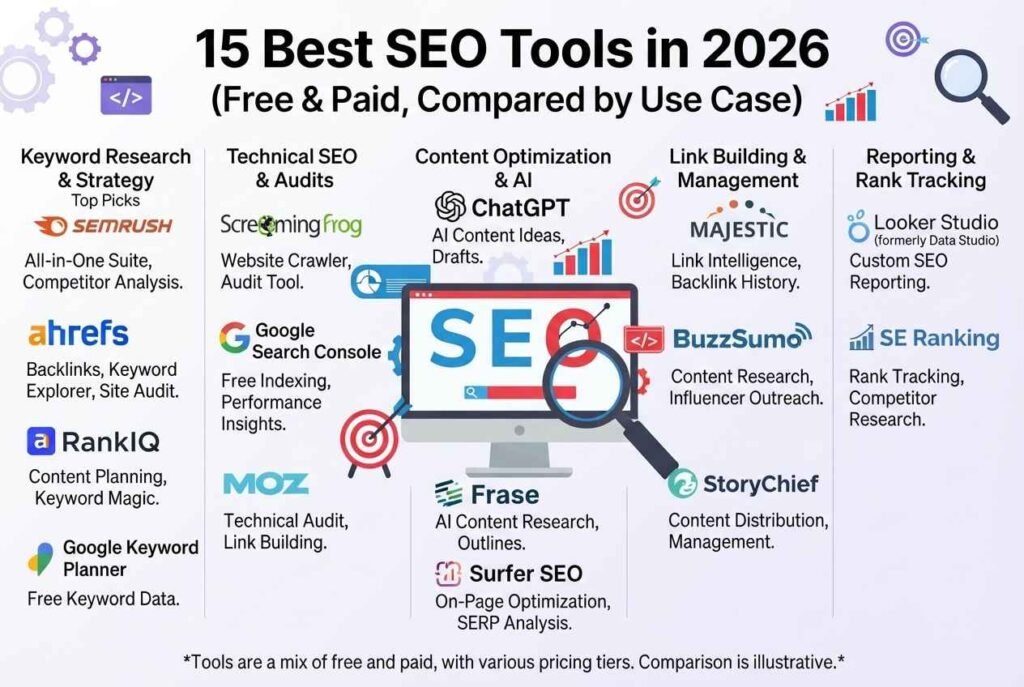
The best SEO tools in 2026 do more than track keywords. They help you find topics people actually search for, fix technical problems that hold pages back, measure links, and now also check whether your brand appears in AI answers from ChatGPT, Google AI Overviews, Perplexity and Gemini. The catch is that there are hundreds of options, prices run from free to several hundred dollars a month, and many “top 10” lists are just affiliate rankings.
This guide takes a practical approach. It explains what each category of SEO tool does, which tools lead each category, what they roughly cost, and who should skip them. It also shows a free starter stack that covers most of what a new blog or small business needs, plus a paid stack for teams that publish weekly. If you only remember one thing, remember this: pick tools based on the job you need done this month, not on the longest feature list.
Quick Answer: What Are the Best SEO Tools?
For most people, the short list looks like this:
- Best all-in-one platform: Semrush — widest coverage of keywords, audits, content, PPC and AI visibility.
- Best for backlinks and competitor research: Ahrefs — large link index and strong Content Explorer.
- Best free foundation: Google Search Console — real search data straight from Google.
- Best technical crawler: Screaming Frog SEO Spider — desktop crawler with a free tier.
- Best for WordPress on-page SEO: Yoast SEO — titles, meta data, schema and readability checks inside the editor.
- Best value alternative: SE Ranking — rank tracking and AI-search monitoring at a lower price than the big two.
- Best budget AI-visibility monitor: Otterly.ai — tracks brand mentions in AI answers at a low monthly cost.
The sections below explain why, and where each tool falls short.
What Are SEO Tools (and Do You Really Need Them)?
SEO tools are software products that measure and improve how a website performs in search engines. They collect data that you can’t see by just looking at your site: which queries you rank for, which pages Google can’t crawl, which competitors earn links you don’t, and which content gaps you could fill.
You don’t need paid tools on day one. Google publishes its own SEO Starter Guide, and its free products cover indexing, clicks and speed. Paid tools become worth the cost when you publish often, compete in a crowded niche, or manage several sites and need faster research. A useful rule: if you publish less than once a month, the free stack below is enough; if you publish weekly, one paid platform usually pays for itself. [INTERNAL LINK: your article about SEO basics, blogging or digital marketing]
The Main Types of SEO Tools
Most tools fall into six jobs. Knowing the job first prevents you from paying for overlap.
- Keyword research tools — find search demand, difficulty and related questions.
- Technical SEO and site audit tools — crawl your site and flag errors, speed problems and indexing issues.
- On-page and content optimization tools — score drafts against top-ranking pages.
- Backlink and competitor analysis tools — reveal who links to you and to rivals.
- Rank tracking and analytics tools — show whether your work is moving positions and traffic.
- AI search (GEO/LLM) visibility tools — measure whether AI assistants cite or mention your brand.
The next sections cover each job with specific tools.
Best Free SEO Tools (Your Starter Stack)
You can build a surprisingly strong setup without spending anything. These are the free tools worth learning first.
1. Google Search Console
Google Search Console is the single most important free SEO tool because the data comes directly from Google. It shows which queries trigger your pages, your average position, click-through rate, indexing status, mobile usability problems and manual actions. Submit your XML sitemap here and use the URL Inspection tool to check whether a new article is indexed.
Best for: every site owner. Limitation: it reports on your own site only, so it can’t spy on competitors.
2. Google Analytics 4
Google Analytics tells you what visitors do after they land: which pages keep them reading, which sources send traffic and which pages lead to conversions. Pair it with Search Console (they connect inside Google’s Site Kit plugin for WordPress) so you see queries and behavior together.
3. Google Trends and Keyword Planner
Google Trends shows whether interest in a topic is rising, seasonal or fading, which helps you pick evergreen topics. Google Keyword Planner gives search volume ranges and related ideas. Volumes are broad ranges unless you run ads, but it is still a useful free reference.
4. Bing Webmaster Tools
Bing Webmaster Tools matters more than many people think, because Bing data feeds several AI assistants and search products. It includes an IndexNow option for pushing new URLs quickly and a site scan for basic errors.
5. PageSpeed Insights
PageSpeed Insights runs Lighthouse and shows real-user Core Web Vitals when enough data exists. Since speed affects both rankings and user behavior, check your top ten pages monthly. Read Google’s Core Web Vitals guide to understand LCP, INP and CLS. [INTERNAL LINK: your website speed, WordPress or hosting article]
6. Ahrefs Webmaster Tools
Ahrefs Webmaster Tools is free for sites you verify. You get a site audit plus a look at your own backlinks and organic keywords from a well-known link index. It is one of the best free ways to see who links to you.
7. Screaming Frog (free version)
The Screaming Frog SEO Spider crawls up to 500 URLs on the free plan. It finds broken links, redirect chains, missing titles, duplicate meta descriptions and thin pages in minutes. For a small blog, the free limit is often enough.
8. Yoast SEO for WordPress
Yoast SEO handles the on-page basics inside the WordPress editor: SEO title, meta description, focus keyphrase, canonical URLs, XML sitemaps, breadcrumbs and structured data. It also gives readability feedback. It doesn’t replace keyword research, but it removes a lot of manual setup. [INTERNAL LINK: your Yoast, WordPress or blogging tutorial]
Best Paid All-in-One SEO Platforms
When you want research, tracking and audits in one login, these are the leaders.
9. Semrush
Semrush is the most complete suite for marketers. Its Keyword Magic Tool, Site Audit, Position Tracking, backlink analytics, content tools and competitor reports live in one interface, and it has added AI-visibility features for tracking brand presence in AI answers. Reported starting prices for the main SEO plan sit around $140 per month in 2026, with higher tiers for agencies; AI visibility features are often sold as an add-on or higher plan.
Best for: marketers, agencies and small teams that want one platform. Watch out for: the total bill can grow quickly once you add AI modules, extra users or extra projects.
10. Ahrefs
Ahrefs is known for backlink data, a fast-updating link index, Site Explorer, Keywords Explorer and the Content Explorer for finding link-worthy pages. Its Brand Radar feature tracks how brands appear in AI-generated answers. Entry-level plans exist at low monthly prices with tight limits, while the plans most professionals use typically start closer to the low hundreds per month.
Best for: link building, competitor research and content gap analysis. Watch out for: on-page content scoring is lighter than dedicated content tools.
11. Moz Pro
Moz Pro offers keyword research, site crawls, rank tracking and Domain Authority, a metric many agencies still report to clients. It is friendly to beginners, and its explanations are clear. Its link and keyword databases are usually considered smaller than Semrush or Ahrefs, so treat its numbers as directional.
12. SE Ranking
SE Ranking is a popular value pick. It covers rank tracking, audits, backlinks, content tools and white-label reports, and it includes AI-search tracking across major assistants on higher plans. Reviewers regularly point out that it costs noticeably less than Semrush for a similar tracked-keyword count. It suits freelancers and agencies with several clients.
13. Mangools and Ubersuggest (budget options)
Mangools (KWFinder, SERPChecker, SiteProfiler) is simple, cheap and readable, which makes it good for solo bloggers. Ubersuggest is another low-cost route, often sold with lifetime-style pricing. Both have smaller datasets than the premium platforms, so they work best for basic keyword ideas and quick checks rather than deep competitive research.
Best Tools for Content Optimization
Content tools compare your draft with top-ranking pages and suggest missing topics, headings and related terms.
- Surfer SEO — a real-time content editor with a score based on competing pages. Prices usually start below the big platforms. Use it as a guide, not a rulebook; a high score doesn’t guarantee rankings.
- Frase — combines research briefs, outlines and content scoring, and adds generative-search scoring. It is often chosen as a budget option.
- Clearscope and MarketMuse — enterprise-oriented content platforms priced for larger teams.
- AlsoAsked and AnswerThePublic — map “People also ask” questions and question-style queries, which are excellent for FAQ sections and long-tail articles.
If you use AI writing assistants, keep a human editor in the loop. Google’s guidance on helpful, people-first content and its policy on spam and low-quality automation both reward original information and penalize mass-produced pages made only to rank. [INTERNAL LINK: your AI writing tools, ChatGPT or AI content article]
Best Technical SEO and Site Audit Tools
Technical problems quietly cap your growth, because a page that Google can’t crawl or render can’t rank.
- Screaming Frog (paid license) removes the 500 URL limit, connects to Search Console and Analytics, renders JavaScript and finds duplicate content at scale.
- Sitebulb (sitebulb.com) turns crawl data into prioritized, readable audits, which helps when you must explain problems to clients or developers.
- Semrush Site Audit and Ahrefs Site Audit run scheduled crawls and flag new issues automatically.
- Google’s Rich Results Test (search.google.com/test/rich-results) checks whether your structured data can qualify for rich results.
- Schema Markup Validator (validator.schema.org) checks any schema.org markup for syntax problems. Learn the vocabulary at Schema.org.
A simple monthly audit routine: crawl the site, fix broken links and redirect chains, check indexing in Search Console, review Core Web Vitals, confirm that key pages are in the sitemap, and make sure no important page is blocked by robots.txt or a stray noindex tag. [INTERNAL LINK: your website security, SSL or technical website maintenance article]
Best Backlink Analysis and Link-Building Tools
Links remain one of the strongest ranking signals, but quality beats quantity. Ahrefs and Semrush are the two main choices, and several tools help with the outreach side:
- Link gap analysis in Ahrefs or Semrush shows domains that link to competitors but not you. That list becomes your outreach targets.
- Hunter finds professional email addresses for outreach, and Pitchbox or BuzzStream manage outreach campaigns at scale.
- Journalist-request and expert-quote platforms connect you with journalists who need sources, which can earn genuine editorial links.
- Google Search Console’s Links report is a free check for the domains that link to you.
Avoid buying link packages. Google’s spam policies explicitly cover link schemes, and a penalty costs far more than any short-term boost.
Best Rank Tracking Tools
Tracking positions shows whether your effort is working. Semrush Position Tracking, Ahrefs Rank Tracker and SE Ranking all handle daily updates by device and location. AccuRanker focuses only on fast, accurate rank tracking, which suits agencies with large keyword lists. For small sites, Search Console’s average position data is often good enough, as long as you look at trends, not a single day.
AI SEO, GEO and LLM Visibility Tools
Search is no longer only ten blue links. People now get answers from Google AI Overviews and AI Mode, ChatGPT, Perplexity, Gemini, Copilot and Claude. These systems cite pages, mention brands and summarize sources, so a new class of tools measures that visibility. The practice is often called GEO (generative engine optimization) or AI SEO.
What these tools typically do:
- Run a set of prompts on a schedule across several AI assistants.
- Record whether your brand or URL is mentioned or cited.
- Show competitor share of voice and the sources AI answers rely on.
- Suggest content or page changes that could improve citations.
Tools to know:
- Semrush’s AI visibility toolkit — added to the Semrush workflow; often an add-on or higher plan.
- Ahrefs Brand Radar — searches a large database of AI answers and shows which pages and domains appear around a brand.
- Otterly.ai — a low-cost option focused on monitoring brand mentions in AI search.
- AthenaHQ and similar dedicated GEO platforms — monitor several assistants and prioritize actions.
- SE Ranking’s AI tracking — bundled into some plans, which reduces the need for a second subscription.
An important caveat from the research published on these platforms: ranking well in Google does not automatically mean AI assistants will cite you. Track classic rankings and AI visibility as separate metrics, and check how many prompts and engines each plan includes before paying. Vendors update coverage often, so confirm current features on the vendor site.
How to Optimize Content for AI Search (Without Any Tool)
Whatever tool you choose, the fundamentals of being cited are the same, and you can apply them today:
- Answer the question directly near the top. Put a clear two-to-three-sentence answer under each question-style heading.
- Use clean structure. One H1, logical H2/H3 headings, short paragraphs, lists and tables that are easy to extract.
- Show expertise and sources. Name the author, add real data, and link out to official documentation. Google’s E-E-A-T guidance is a good checklist.
- Add FAQ sections and structured data so each question has a self-contained answer.
- Keep facts fresh. Update pricing, dates and screenshots at least twice a year; stale facts reduce trust.
- Be consistent about your brand and entity. Use the same name, About page and Organization schema across your site and profiles.
- Allow crawling. Check your robots.txt and any AI-crawler rules so you don’t block bots you actually want to be cited by.
[INTERNAL LINK: your article about how AI works, ChatGPT or AI search]
SEO Tools Comparison Table
| Tool | Best for | Approx. starting price (mid-2026) | Free option? |
|---|---|---|---|
| Google Search Console | Real Google search data | Free | Yes |
| Google Analytics 4 | Traffic and behavior | Free | Yes |
| Bing Webmaster Tools | Bing data, IndexNow | Free | Yes |
| Ahrefs Webmaster Tools | Own-site audit and backlinks | Free | Yes |
| Screaming Frog | Technical crawling | Free up to 500 URLs; paid license for more | Yes |
| Yoast SEO | WordPress on-page SEO | Free core plugin; Premium available | Yes |
| Semrush | All-in-one marketing suite | About $140/month and up | Limited free plan |
| Ahrefs | Backlinks and competitor research | Entry plans low; common plans from ~$129/month | Webmaster Tools |
| Moz Pro | Beginners, Domain Authority | Mid-range monthly plans | Trial |
| SE Ranking | Value rank tracking + AI monitoring | Roughly $50–$130/month depending on plan | Trial |
| Surfer SEO | Content scoring | Roughly $90/month and up | No |
| Otterly.ai | Low-cost AI visibility monitoring | About $29/month and up | Trial |
Prices are approximate, reported in 2026 comparisons, and change with billing cycle and region. Always confirm on the vendor site.
How to Choose the Right SEO Tool (Step by Step)
- Define the job. Are you finding topics, fixing a site, building links or checking AI mentions?
- Start free. Set up Search Console, Analytics, Bing Webmaster Tools and PageSpeed Insights before buying anything.
- Check the data limits. Look at tracked keywords, projects, crawl limits, users and AI prompts. Limits, not features, usually decide the real cost.
- Test with a trial. Run the same three keywords and one competitor in two tools and compare the results.
- Match the tool to your publishing pace. Weekly publishing justifies a paid platform; monthly publishing usually doesn’t.
- Review every quarter. Cancel modules you didn’t open in the last 30 days.
Recommended SEO Tool Stacks
The zero-cost stack (bloggers and new sites): Search Console, Google Analytics, Bing Webmaster Tools, PageSpeed Insights, Google Trends, Ahrefs Webmaster Tools, Screaming Frog free and Yoast SEO. This covers indexing, performance, basic audits, backlinks and on-page optimization.
The lean paid stack (solo creator or small business): the free stack plus one paid platform (Semrush, SE Ranking or Mangools) for keyword research and rank tracking, and optionally a low-cost AI-visibility monitor.
The growth stack (agency or in-house team): Semrush or Ahrefs as the core platform, Screaming Frog or Sitebulb for deep audits, Surfer or Frase for content briefs, an outreach tool, and a dedicated AI-visibility platform if AI answers matter to your revenue.
How to Find Low-Difficulty, Evergreen Keywords With These Tools
Because low competition and steady demand are what let articles rank for years, here is a simple workflow:
- Collect ideas. Enter a broad topic in Keyword Magic, Keywords Explorer or Keyword Planner and export related terms and questions.
- Filter by difficulty and intent. Keep keywords with modest difficulty scores and a clear purpose (informational, comparison or how-to).
- Check the results page. Open the top ten results. If small sites, forums or thin pages rank, the keyword is probably winnable.
- Check the trend. In Google Trends, prefer flat or rising lines over spikes; evergreen means steady demand year after year.
- Map one keyword to one page. Avoid two articles competing for the same query.
- Add related questions. Use AlsoAsked or “People also ask” to build the FAQ section.
- Update and interlink. Refresh the article regularly and link to it from related posts. [INTERNAL LINK: your keyword research or blogging tips article]
Remember that keyword difficulty scores are estimates, and each tool calculates them differently. Use them for comparison, not as absolute truth.
Common Mistakes When Using SEO Tools
- Chasing scores instead of readers. A content score of 95 means little if the article doesn’t answer the query better than competitors.
- Trusting one metric. Domain Authority, Domain Rating and Authority Score are third-party numbers, not Google metrics.
- Ignoring search intent. Ranking for a keyword whose intent doesn’t match your page brings traffic that doesn’t convert.
- Fixing every audit warning. Prioritize errors that affect crawling, indexing and user experience; many warnings are minor.
- Paying for overlapping tools. Two all-in-one platforms rarely make sense for a small site.
- Neglecting AI visibility. If your audience uses AI assistants, check whether your brand appears there at least monthly.
- Skipping Search Console. Third-party estimates never replace first-party data.
Frequently Asked Questions About SEO Tools
What are the best SEO tools for beginners?
Start with Google Search Console, Google Analytics, Google Trends and PageSpeed Insights. If you use WordPress, add Yoast SEO. These are free and cover indexing, traffic, topic research, speed and on-page basics.
Are free SEO tools good enough?
For a new blog or small local site, yes. A free stack covers most needs. Paid tools mainly add faster keyword research, larger backlink databases, competitor data and automated rank tracking.
Which is better, Semrush or Ahrefs?
Semrush is usually the better all-in-one choice because it covers content, PPC, local and AI visibility. Ahrefs is usually stronger for backlink analysis and content gap research. Trial both with your own keywords.
What is the cheapest paid SEO tool worth using?
Budget options such as Mangools, Ubersuggest, SE Ranking’s lower plans and low-cost AI monitors like Otterly are common picks. Compare limits (keywords, projects, prompts), not only the headline price.
What are AI SEO tools?
AI SEO tools either use AI to speed up research and writing, or track how your brand appears in answers from ChatGPT, Google AI Overviews, Perplexity and Gemini. Many platforms now do both.
Do I need SEO tools to rank on Google?
No. Google ranks pages, not tool usage. Tools simply make it faster to find opportunities and problems. Helpful content, a crawlable site and good user experience matter most.
How often should I use SEO tools?
Check Search Console weekly, run a technical audit monthly, review rankings and backlinks monthly, and audit your AI visibility monthly or quarterly.
Can SEO tools guarantee rankings?
No. No tool or agency can guarantee a specific position. Tools provide data and recommendations; results depend on content quality, competition, links and technical health.
The best SEO tools are the ones you actually open every week. Begin with the free Google tools, add a crawler and a WordPress SEO plugin, and only then invest in a paid platform that matches how often you publish. In 2026, add one more habit: measure whether AI assistants mention your brand, because a growing share of discovery happens there. Combine solid tools with useful, well-structured, regularly updated articles, and your pages have the best chance of ranking for years instead of weeks.