Assistive technology is one of the most consequential and least understood categories of technology in everyday use. It ranges from a rubber pencil grip that costs less than a dollar to eye-gaze-controlled speech devices worth thousands, and it touches classrooms, workplaces and homes far more often than most people realise. This guide explains what assistive technology actually is, walks through every major category — hearing, vision, speech, mobility, learning and classroom use — and covers the legal framework, real device examples, and how to become an assistive technology professional.
What Is Assistive Technology?
Assistive technology (AT) is any item, piece of equipment, software or product system — whether bought off the shelf, modified, or custom-built — that is used to increase, maintain or improve the functional capabilities of a person with a disability. That is the exact legal definition used in US federal law under the Individuals with Disabilities Education Act (IDEA), and it is deliberately broad: AT can be as simple as a pencil grip or as advanced as an eye-controlled communication device. The one thing it excludes is a surgically implanted medical device.
Assistive Technology at a Glance
| Legal definition source | Individuals with Disabilities Education Act (IDEA), Section 300.5 |
| Three complexity tiers | Low-tech, mid-tech, high-tech |
| Major functional categories | Vision, hearing, speech/communication, mobility, learning/cognition, daily living, computer access |
| Key US laws | IDEA (education), ADA (public access), Section 504 & Section 508 (federal programs and technology) |
| Global AT need | Over 2.5 billion people worldwide need one or more assistive products, per the World Health Organization |
| Related professional field | Assistive Technology Professional (ATP), certified through RESNA |
What Is Assistive Technology? A Deeper Look
Assistive technology isn’t new — it has existed for as long as people have adapted tools to overcome physical or sensory limitations. Historians trace the earliest documented eyeglasses to Italy between 1268 and 1289, and the first recorded wheelchair use to 5th-century China. What has changed is not the concept but the scale and sophistication of what falls under the term today.
The key distinction between AT and mainstream technology is intent. A smartphone is mainstream technology built for general convenience; a screen reader running on that same phone, or a switch-adapted case that lets someone with limited hand mobility operate it, is assistive technology — built or adapted to address a specific functional barrier.
Assistive Technology vs. Adaptive Technology
These two terms are frequently used interchangeably, and in casual usage that is fine. Where a distinction is drawn, assistive technology is usually treated as the broader umbrella term covering any tool that helps a person with a disability perform a task, while adaptive technology more specifically refers to technology that has been modified or customised to meet an individual’s particular needs — an existing device changed rather than a purpose-built one. A standard keyboard modified with larger, high-contrast keys is adaptive technology; the category it belongs to is assistive technology.
Low-Tech, Mid-Tech and High-Tech Assistive Technology
Special education and rehabilitation professionals commonly sort AT devices into three tiers based on complexity and cost — a framework worth understanding before looking at specific device categories.
| Tier | Characteristics | Examples |
|---|---|---|
| Low-tech | No electricity or batteries required; inexpensive, widely available, little to no training needed | Pencil grips, slant boards, picture schedules, magnifying glasses, communication boards |
| Mid-tech | Uses batteries or basic circuitry; moderate cost and training | Battery-operated switches, single-message speech devices (BigMack), talking calculators |
| High-tech | Computerised or software-driven; higher cost, often requires specialised setup and training | Eye-gaze speech-generating devices, screen readers, powered wheelchairs with smart controls |
This tiered thinking matters practically: professionals conducting an AT assessment are trained to consider whether a low-tech solution can meet a need before recommending something expensive and complex. A rubber pencil grip that lets a student produce legible handwriting is, in many cases, a completely sufficient answer — no computer required.
The Major Categories of Assistive Technology
Government AT programmes, including Minnesota’s state assistive technology guide, commonly organise devices into roughly a dozen functional categories. The sections below expand on the ones most frequently searched.
Hearing Assistive Technology
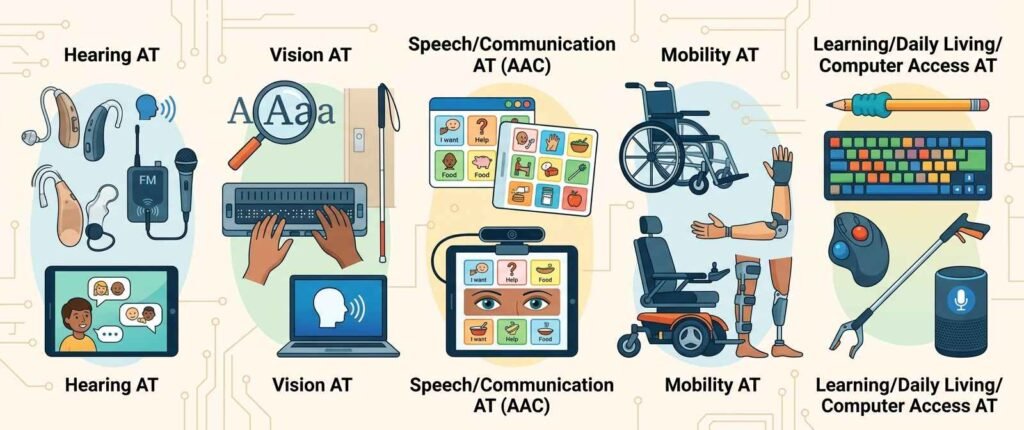
Hearing assistive technology covers tools that help people who are deaf or hard of hearing access sound, spoken communication, and auditory alerts they would otherwise miss. This category has expanded significantly beyond traditional hearing aids.
- Hearing aids and cochlear implants — amplify or, in the case of cochlear implants, directly stimulate the auditory nerve to bypass damaged parts of the ear.
- FM and Bluetooth assistive listening systems — transmit a speaker’s voice directly to a listener’s hearing aid or headset, cutting through background noise in classrooms, theatres and meeting rooms.
- Captioning and real-time transcription — live captioning services (CART) and automatic speech-to-text apps that convert spoken conversation into readable text in real time.
- Visual and vibrating alert systems — doorbells with flashing lights, vibrating alarm clocks, and smoke detectors with strobe lights in place of or alongside sound.
- TTY/TDD and video relay services — text-based and sign-language video systems that allow phone communication without relying on spoken audio.
This is often the entry point into assistive technology for hearing impaired individuals more broadly: rather than one device solving everything, most people who are deaf or hard of hearing use a combination from this list depending on the setting — a hearing aid at home, an FM system at school, and captioning for video calls.
Assistive Technology for Visually Impaired Users
Vision-related AT spans an especially wide range, from no-tech solutions to highly sophisticated software, because “visual impairment” itself covers a spectrum from low vision to total blindness.
- Screen readers — software such as JAWS, NVDA and VoiceOver that reads on-screen text aloud, allowing full computer and smartphone use without sight.
- Screen magnification software — enlarges on-screen content and adjusts contrast for users with low vision.
- Braille displays and embossers — refreshable braille displays that convert digital text into physical braille characters in real time, and embossers that print braille documents.
- Optical character recognition (OCR) devices — handheld scanners and apps that read printed text aloud, including menus, mail and product labels.
- White canes and electronic travel aids — from the traditional long cane to devices using ultrasonic sensors or AI-based obstacle detection for independent navigation.
- Large-print and tactile materials — enlarged text documents, tactile diagrams and raised-line drawings for educational and everyday use.
Smartphone-based tools have meaningfully changed this category over the past decade — a device that used to require a dedicated, expensive piece of hardware, such as a text-to-speech scanner, is now frequently available as a phone app, lowering both cost and the stigma some users associate with visibly specialised equipment.
Speech Assistive Technology and Communication Aids
Speech assistive technology supports individuals who have difficulty producing or understanding spoken language, whether due to a developmental disability, a physical condition affecting speech muscles, a stroke, or a degenerative condition such as ALS. This field is formally known as Augmentative and Alternative Communication (AAC), and it is one of the most active and fast-evolving areas of AT.
- Communication boards and books — low-tech picture or symbol boards a person points to in order to build messages, requiring no electricity at all.
- Speech-generating devices (SGDs) — dedicated hardware or tablet apps that convert selected symbols, typed text, or eye movements into synthesised speech output.
- Eye-gaze and switch-access communication systems — for users with very limited or no voluntary movement, these allow message construction using only eye movement or a single physical switch.
- Voice banking and message banking — technology that records a person’s own voice before a condition progresses, so their speech-generating device can later “speak” in a voice that sounds like them rather than a generic synthetic voice.
The broader concept of communication aids and strategies using tools of technology extends beyond dedicated AAC hardware to include structured teaching approaches — core vocabulary boards, visual schedules, and social scripts — that pair a physical or digital tool with a specific communication strategy taught alongside it. A device alone rarely works without a strategy for how it is used and taught.
Mobility Technology and Devices for Physical Disabilities
Mobility technology and broader assistive technology devices for physical disabilities help individuals move, transfer, reach and manipulate objects independently.
- Wheelchairs — manual, powered, and increasingly smart wheelchairs with programmable controls, obstacle sensors and posture adjustment.
- Walkers, canes and crutches — ranging from simple canes to rollators with integrated seating and storage.
- Prosthetics and orthotics — externally worn devices that replace or support a missing or impaired limb, now increasingly incorporating myoelectric sensors that respond to muscle signals.
- Transfer and lift equipment — hoists, transfer boards and ceiling track lift systems that assist moving between a bed, wheelchair and other surfaces.
- Adapted vehicle controls — hand controls, steering knobs and wheelchair-accessible vehicle modifications that enable independent driving.
- Environmental control units — systems that let a person operate lights, doors, thermostats and appliances via switch, voice or eye-gaze control.
- Adaptive daily-living tools — built-up utensil handles, button hooks, reachers and dressing aids that support independence in everyday self-care tasks.
This category overlaps significantly with what is sometimes marketed as device technology for independent living — the term used loosely by manufacturers and retailers to describe consumer-facing adaptive hardware, from smart-home integrations to adapted kitchen tools, aimed at people ageing in place or living with a physical disability.
Assistive Technology in the Classroom
Assistive technology in the classroom is governed by federal special education law in the United States, and understanding that legal backbone is essential for parents, teachers and administrators alike.
The Legal Foundation: IDEA
Under the Individuals with Disabilities Education Act (IDEA), every student with a disability who has an Individualized Education Program (IEP) must have their AT needs considered by the IEP team, and the school district is legally required to provide any AT device or service found necessary for the student to access their education — at no cost to the family. IDEA identifies thirteen disability categories, and students across all of them may qualify for AT support, from specific learning disabilities to autism, hearing and visual impairments, and orthopaedic impairments.
IDEA distinguishes between an AT device (the physical item or software) and an AT service (the support surrounding it, including evaluation, training for the student, and training for teachers and family members). A school can be fully compliant on paper by purchasing a device and still fail a student if no one is trained to use it — which is why the “service” side of the law matters as much as the “device” side.
Common Classroom AT Examples
- Text-to-speech and speech-to-text software — reads digital text aloud for students with reading disabilities, and converts spoken words to text for students who struggle with writing.
- Graphic organisers and word prediction software — support students with dyslexia, dysgraphia or executive function challenges in structuring written work.
- Audiobooks and accessible digital textbooks — alternative formats for students who cannot access standard print.
- FM listening systems — as covered under hearing AT, widely used specifically in classroom settings to help a student focus on a teacher’s voice over ambient noise.
- Adapted seating and sensory tools — wobble cushions, standing desks and fidget tools supporting students with sensory processing or attention-related needs.
- Switch-adapted toys and devices — used with younger students with significant physical disabilities to enable participation in classroom activities.
Instructional technology and assistive technology overlap heavily in classrooms but are not identical. Instructional technology is designed to teach content to any student; assistive technology exists specifically to remove a barrier for a student with a disability. The same tablet app can function as either, depending on which student is using it and why.
Assistive Technology for Students with Disabilities: Beyond K-12
Support does not end at high school graduation. Students moving into higher education transition from IDEA’s mandate-based system to a different legal framework — Section 504 of the Rehabilitation Act and the Americans with Disabilities Act (ADA) — both of which require reasonable accommodation but place more responsibility on the student to self-identify and request support through a campus disability services office.
Common college-level supports include extended test time paired with assistive software, note-taking technology, accessible course materials in alternative formats, and campus-funded access to the same categories of AT used in K-12 — screen readers, speech-to-text software and hearing assistive systems in lecture halls. Students and families should know this transition is not automatic; unlike IDEA, colleges do not proactively identify need, so registering with a disability services office early is essential.
Examples of Assistive Technology: A Quick Reference List
For readers who want a fast, categorised reference rather than a full explanation, here is a consolidated list of examples of assistive technology spanning every tier and category covered above.
| Need Area | Low-Tech Example | High-Tech Example |
|---|---|---|
| Vision | Large-print books, magnifying glass | Screen reader software, refreshable braille display |
| Hearing | Written notes, visual alert light | Cochlear implant, Bluetooth captioning app |
| Speech/Communication | Picture communication board | Eye-gaze speech-generating device |
| Mobility | Cane, walker | Powered wheelchair with smart controls |
| Learning/Cognition | Highlighted text, checklists | Word prediction and text-to-speech software |
| Daily Living | Built-up utensil handle | Voice-controlled smart home system |
| Computer Access | Keyguard overlay | Eye-tracking mouse control |
This kind of quick reference is useful precisely because a single “example of assistive technology” rarely exists in isolation — most individuals use a combination drawn from several categories simultaneously, matched to different environments and tasks throughout the day.
The Assistive Technology Application and Assessment Process
Getting an appropriate assistive technology application — meaning both the process of applying for AT funding or services, and the practical application of a device to a real need — typically follows a structured sequence.
- Referral and initial screening. A teacher, therapist, physician or the individual themselves identifies a functional barrier that a device might address.
- Formal AT assessment. A qualified evaluator — often an occupational therapist, speech-language pathologist, or certified Assistive Technology Professional — observes the individual in real-world tasks and environments, not just in a clinical setting.
- Trial period. Whenever possible, the individual trials candidate devices for a period of days or weeks before a final decision, since a device that works well in an evaluation room can fail in daily use.
- Funding and procurement. Depending on context, funding may come through a school district (under IDEA), a state vocational rehabilitation agency, private insurance, Medicaid, or out of pocket. Many US states also run low-cost AT loan libraries and reuse programmes.
- Training and follow-up. The individual, family members, and relevant staff (teachers, caregivers, employers) receive training on the device, followed by periodic reassessment as needs change.
The trial period step is frequently skipped under time or budget pressure, and it is consistently cited by AT professionals as the single most common reason an approved, funded device ends up unused in a drawer within a year.
Paying for Assistive Technology: Funding Options
Cost is consistently the biggest barrier reported by families and individuals seeking AT, particularly for mid-tech and high-tech devices that can run from several hundred to tens of thousands of dollars. Several funding routes exist, and most people end up combining more than one.
- School districts (IDEA) — for students with a qualifying IEP, AT assessed as necessary for education access must be provided at no cost to the family, though this covers educational use rather than a device for home or general life use.
- Health insurance and Medicaid — mobility equipment, hearing aids and some communication devices are often covered when deemed “medically necessary,” though coverage varies enormously by state and insurer, and the approval process can be lengthy.
- State vocational rehabilitation agencies — support AT needed for employment or job training, distinct from the education-focused support under IDEA.
- AT loan and reuse programmes — most US states run low-cost loan libraries where devices can be borrowed for a trial period, and reuse programmes that refurbish and redistribute previously owned equipment, sometimes at no cost.
- Nonprofit grants and disability organisations — condition-specific organisations (such as those focused on ALS, cerebral palsy or autism) frequently offer grants specifically for AT devices their community needs most.
- Crowdfunding and community fundraising — increasingly common for high-cost devices that fall into gaps between insurance and school funding, particularly for adults who no longer qualify for IDEA support.
A practical first step for most families is contacting their state’s AT Act programme — every US state and territory operates one, funded under the federal Assistive Technology Act, offering device loans, demonstrations and funding guidance at no cost.
Assistive Technology in the Workplace
Workplace AT operates under a different framework than the classroom. The Americans with Disabilities Act (ADA) requires covered employers to provide “reasonable accommodation” to qualified employees with disabilities, which frequently includes assistive technology, but — unlike IDEA — the employee must typically request the accommodation rather than the employer proactively identifying a need.
Common workplace AT includes screen readers and magnification software for employees who are blind or have low vision, captioning for meetings and video calls, ergonomic and adapted input devices for employees with physical disabilities, and speech-to-text software for note-taking and documentation. The Job Accommodation Network (JAN), a free US government-funded service, is one of the most widely used resources for both employees and employers navigating what accommodation is reasonable and how to source it.
A growing area of workplace AT concerns digital accessibility rather than physical devices — ensuring that internal software, websites and documents are compatible with screen readers and other AT a new hire may already rely on. This has become a significant driver of demand for AT professionals working specifically in digital accessibility auditing, separate from the traditional clinical AT assessment role.
Common Misconceptions About Assistive Technology
Several persistent myths shape how AT is discussed, and correcting them matters for anyone making decisions about it.
- “AT is always expensive.” Many of the most effective solutions — pencil grips, communication boards, picture schedules — cost very little. High cost is associated with a minority of high-tech devices, not the category as a whole.
- “A device is a permanent, one-time solution.” Needs change over time, especially for children and for progressive conditions. AT plans require periodic reassessment, not a single purchase decision.
- “AT is only for severe or visible disabilities.” A significant share of AT use addresses less visible conditions — dyslexia, ADHD, chronic pain — where the barrier is real but not immediately apparent to an observer.
- “More advanced technology is always the better choice.” The tiered low/mid/high-tech framework exists precisely because the simplest tool that meets the need is usually the right one; unnecessary complexity increases abandonment risk.
- “AT is a substitute for other supports.” AT devices work best paired with training, instruction and strategy — a speech-generating device without communication partner training, for instance, consistently underperforms one introduced alongside a structured teaching approach.
Becoming an Assistive Technology Professional
An assistive technology professional (ATP) is a specialist trained to evaluate the needs of individuals with disabilities and match them with appropriate AT devices and services. It is a distinct, credentialed career path that draws people from several backgrounds.
The ATP Certification
The recognised credential in this field is the ATP certification, administered by RESNA (the Rehabilitation Engineering and Assistive Technology Society of North America). Candidates typically need a combination of relevant education and hands-on experience in AT service delivery before sitting the exam, which covers assessment, device selection across all major AT categories, funding processes, and service delivery. Many ATPs also hold a primary licence in a related field first — occupational therapy, physical therapy, speech-language pathology, rehabilitation engineering or special education — and add the ATP credential as a specialisation on top.
Where Assistive Technology Professionals Work
- School districts, as part of a special education AT team
- Hospitals and rehabilitation centres, particularly for seating, mobility and complex communication needs
- State vocational rehabilitation and assistive technology loan programmes
- Durable medical equipment (DME) and AT device manufacturers and suppliers
- Independent living centres and disability advocacy organisations
- Private consulting, conducting workplace and higher-education accommodation assessments
Demand for this role has grown alongside two converging trends: an ageing population increasingly relying on mobility and daily-living AT, and stronger enforcement of digital accessibility requirements in workplaces and public institutions, which has created a parallel need for AT expertise applied to software and web accessibility rather than only physical devices.
Where Assistive Technology Is Heading
Several developments are reshaping the field heading into the rest of the decade:
- AI-powered captioning and description — real-time speech-to-text and automated image description are making mainstream apps and devices dramatically more accessible without dedicated hardware.
- Mainstream device convergence — accessibility features built directly into smartphones and operating systems (screen readers, magnification, switch control) are reducing reliance on separate, expensive dedicated devices for many users.
- Brain-computer interfaces — still largely in research and early clinical trial stages, but with meaningful implications for individuals with the most severe motor impairments who cannot reliably use switches or eye-gaze systems.
- 3D-printed adaptive equipment — lowering the cost of custom low-tech and mid-tech solutions, particularly prosthetics and adaptive grips, in both clinical and community-maker settings.
- Universal design momentum — a growing push to build accessibility into mainstream products from the start, rather than treating AT as an add-on after the fact.
For readers interested in how AI is reshaping accessibility tools specifically, our guide to what agentic AI actually means covers the underlying technology increasingly powering next-generation captioning and description tools.
Frequently Asked Questions About Assistive Technology
What is assistive technology?
Assistive technology is any item, piece of equipment, software or product system used to increase, maintain or improve the functional capabilities of a person with a disability. It ranges from simple, inexpensive tools like pencil grips to advanced software and hardware like eye-gaze communication devices.
What are examples of assistive technology?
Examples span every functional area: screen readers and magnifiers for vision, hearing aids and captioning apps for hearing, communication boards and speech-generating devices for speech, wheelchairs and canes for mobility, and text-to-speech software for learning and cognition.
What is the difference between low-tech and high-tech assistive technology?
Low-tech assistive technology requires no electricity or batteries, is inexpensive, and needs little training — examples include pencil grips and communication boards. High-tech assistive technology is computerised or software-based, generally costs more, and often requires specialised setup and training, such as eye-gaze speech-generating devices or screen readers.
Is a school required to provide assistive technology?
Yes, in the United States, if a student with a disability has an Individualized Education Program (IEP) under IDEA and the IEP team determines AT is necessary for the student to access their education, the school district must provide it at no cost to the family.
What is the difference between assistive technology and adaptive technology?
Assistive technology is the broader umbrella term for any tool that helps a person with a disability. Adaptive technology more specifically refers to a standard item or device that has been modified or customised for an individual’s particular needs.
What does an assistive technology professional do?
An assistive technology professional (ATP) assesses the functional needs of individuals with disabilities and matches them with appropriate devices and services. The credential is administered by RESNA and is commonly held alongside a primary licence in occupational therapy, speech-language pathology or a related field.
What is hearing assistive technology?
Hearing assistive technology includes hearing aids, cochlear implants, FM and Bluetooth listening systems, real-time captioning, and visual or vibrating alert systems that help people who are deaf or hard of hearing access sound and communication.
How many people need assistive technology worldwide?
The World Health Organization estimates that more than 2.5 billion people globally need one or more assistive products, a number expected to rise to 3.5 billion by 2050 as the global population ages.
Does assistive technology only apply to school-age children?
No. AT is used across the lifespan — in early intervention for infants and toddlers, throughout K-12 and higher education, in the workplace, and in later life for age-related mobility, vision and hearing needs.
What is augmentative and alternative communication (AAC)?
AAC is the specific branch of speech assistive technology covering tools and strategies — from picture boards to speech-generating devices — that support or replace spoken communication for people who cannot rely on speech alone.
Key Takeaways
- Assistive technology is legally defined under IDEA as any device or system that increases, maintains or improves the functional capabilities of a person with a disability.
- AT is commonly sorted into low-tech, mid-tech and high-tech tiers, and into functional categories including vision, hearing, speech, mobility, learning and daily living.
- Schools are legally required to provide necessary AT devices and services to students with an IEP under IDEA, at no cost to families.
- Speech assistive technology falls under the broader field of Augmentative and Alternative Communication (AAC).
- A structured assessment and trial process, not just device selection, is essential to successful AT outcomes — skipping the trial period is the most common cause of abandoned devices.
- Assistive Technology Professional (ATP) is a recognised credential administered by RESNA, typically held alongside a related clinical or educational licence.
- Over 2.5 billion people worldwide need assistive technology, a figure projected to reach 3.5 billion by 2050.
Conclusion
Assistive technology is not a niche category of gadgets — it is a foundational part of how millions of people access education, communication, mobility and independence every day. Understanding the full range, from a low-tech pencil grip to a high-tech eye-gaze communication device, matters for parents navigating an IEP, professionals building a career in the field, and anyone advocating for a family member or student.
The field continues to evolve quickly, particularly as AI-driven captioning, description and mainstream accessibility features narrow the gap between dedicated AT devices and everyday consumer technology. We update this guide as new device categories and legal developments emerge.
Sources and Further Reading
- U.S. Department of Education — IDEA Section 300.5: Assistive Technology Device
- RESNA — Assistive Technology Professional (ATP) Certification
- Minnesota STAR Program — Types of Assistive Technology
- World Health Organization — Assistive Technology Fact Sheet
- ADA.gov — Americans with Disabilities Act
- U.S. Department of Education — Section 504 FAQ
- ASHA — Augmentative and Alternative Communication (AAC)
- Section508.gov — Federal IT Accessibility